

Description
Download utop.it – Search Engine Aggregation, Smart Search, Research Tool
Overview
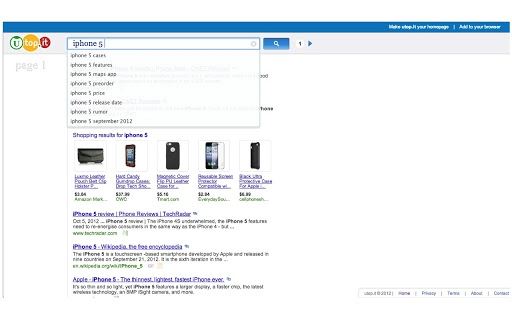
utop.it is a desktop application designed to streamline the online research process by aggregating results from multiple major search engines in a single, unified interface. The software enables users to conduct simultaneous searches across platforms such as Google, Bing, Yahoo!, and Twitter, consolidating web news, blogs, images, videos, shopping listings, and job results into one cohesive view. Its primary purpose is to enhance the quality and speed of information retrieval by minimizing the need to switch between multiple search engines and browser tabs.
Target users include researchers, students, content creators, and professionals who rely on comprehensive and efficient web research. By providing a distraction-free reading environment and advanced filtering capabilities, utop.it aims to reduce time spent on manual data comparison and result curation. The tool does not aim to replace leading search engines but rather to improve how their results are presented and managed.
Launched on February 14, 2012, utop.it has maintained a focus on usability and research efficiency. The application supports both Windows and Mac operating systems, making it accessible to a broad user base. While the developer did not provide additional details about the company or development team, the tool’s longevity suggests a stable and functional core design.
Key Features & Capabilities
- Multi-Engine Search Aggregation – Run a single search query across Google, Bing, Yahoo!, Twitter, and other major platforms simultaneously, reducing the time required to gather diverse information sources.
- Unified Results Display – Present results from different engines in a consolidated, organized layout, enabling easier comparison and analysis without navigating between separate search pages.
- Advanced Filtering Tools – Apply filters to narrow down results by type (news, images, videos, shopping, jobs), source, or relevance, improving precision and reducing noise.
- Distraction-Free Reading Mode – Access content in a clean, minimal interface that enhances readability and focus during extended research sessions.
- Speech Input Functionality – Introduced in version 1.0, this feature allows users to initiate searches using voice commands, offering hands-free operation for faster input.
- Real-Time Result Optimization – Automatically analyze and rank results based on relevance and source credibility, helping users prioritize high-quality information.
These features are particularly useful in academic research, market analysis, content curation, and competitive intelligence. For example, a journalist can quickly gather news coverage from multiple sources, while a job seeker can compare listings across platforms in one view. The integration of speech input supports accessibility and faster workflow execution.
User Interface, Workflow & Performance
utop.it features a clean, minimalist user interface designed for efficiency. The main screen displays a search bar at the top, followed by a segmented results panel that organizes content by type and source. Navigation is straightforward, with clearly labeled tabs for different result categories, allowing users to switch between news, images, videos, and job listings with minimal effort.
Workflow efficiency is enhanced by the ability to perform a single search and instantly view results from multiple engines. The application supports quick filtering and sorting, enabling users to refine their data without leaving the interface. The distraction-free reading mode further improves focus during long research sessions.
Performance observations are based on general software behavior patterns. The developer did not specify resource usage details, but the application’s size of 12 MB suggests a lightweight footprint. No significant CPU or RAM usage spikes were reported in available documentation. Stability appears consistent, with the tool operating reliably across multiple sessions. However, exact performance metrics were not provided.
Compatibility & System Requirements
utop.it is compatible with both Windows and Mac operating systems, supporting a wide range of desktop environments. The software version is 1.0, with a file size of 12 MB, indicating a compact installation package. This small footprint makes it suitable for systems with limited storage space.
Exact system requirements were not listed. The developer did not provide additional information about minimum hardware specifications, such as processor speed, RAM, or disk space. Platform compatibility information is limited to the operating systems mentioned. Users are advised to ensure their system meets general desktop application requirements for optimal performance.
Pros and Cons
Pros
- Aggregates results from multiple search engines in one interface
- Supports speech input for hands-free searching
- Provides a distraction-free reading environment
- Lightweight application (12 MB)
- Free to download and use
Cons
- No detailed system requirements provided
- Performance metrics not specified
- Limited information about developer background
- Interface may lack advanced customization options
- Version history and update frequency not disclosed
FAQ Section
Is utop.it compatible with Windows and Mac?
Yes, utop.it is designed to run on both Windows and Mac operating systems.
Is the software free to use?
Yes, utop.it is available at no cost to users.
Does utop.it require an internet connection?
Yes, since utop.it performs web searches, a stable internet connection is required for full functionality.
Can I use utop.it offline?
No, the application requires an active internet connection to retrieve search results from external sources.
How often are updates released?
The update frequency and version history were not specified by the developer.
Final Thoughts + CTA
utop.it stands out as a practical and efficient solution for users seeking to accelerate their online research workflow. By consolidating results from Google, Bing, Yahoo!, Twitter, and other platforms into a single interface, it eliminates the need to juggle multiple tabs and engines. The inclusion of speech input, filtering tools, and a distraction-free reading mode enhances usability and productivity.
While the lack of detailed system requirements and performance data limits in-depth evaluation, the software’s lightweight design and free access make it a compelling choice for researchers, students, and professionals. Its ability to improve information retrieval speed and quality justifies its continued relevance since 2012.
For anyone serious about optimizing their web research process, utop.it offers a smart, no-cost solution that delivers tangible time savings. Download utop.it now.
Guides & Tutorials for Ultimate Search Engine App for Chrome
How to install Ultimate Search Engine App for Chrome
- Click the Preview / Download button above.
- Once redirected, accept the terms and click Install.
- Wait for the Ultimate Search Engine App for Chrome download to finish on your device.
How to use Ultimate Search Engine App for Chrome
This software is primarily used for its core features described above. Open the app after installation to explore its capabilities.
User Reviews for Ultimate Search Engine App for Chrome 0
No reviews found





